Know where to look.
Clients, locations, racks and mounting places form a clear structure. Each asset has its own record, parameters and context.
IT INFRASTRUCTURE DOCUMENTATION
From the rack to the very last port. Organise your infrastructure, understand its connections and give your team documentation they can work with.
Built for administrators, integrators and IT teams.
LESS GUESSWORK. MORE KNOWLEDGE.
Clients, locations, racks and mounting places form a clear structure. Each asset has its own record, parameters and context.
See both cable endpoints, occupied ports and the topology of documented connections before planning a move or a patching change.
A history of authors and before-and-after values helps you retrace changes. Reports make it easier to hand documentation to your team or client.
MEET RACKDOCS
Real application views. Example infrastructure. Pick an area and explore the details.
01 / INVENTORY
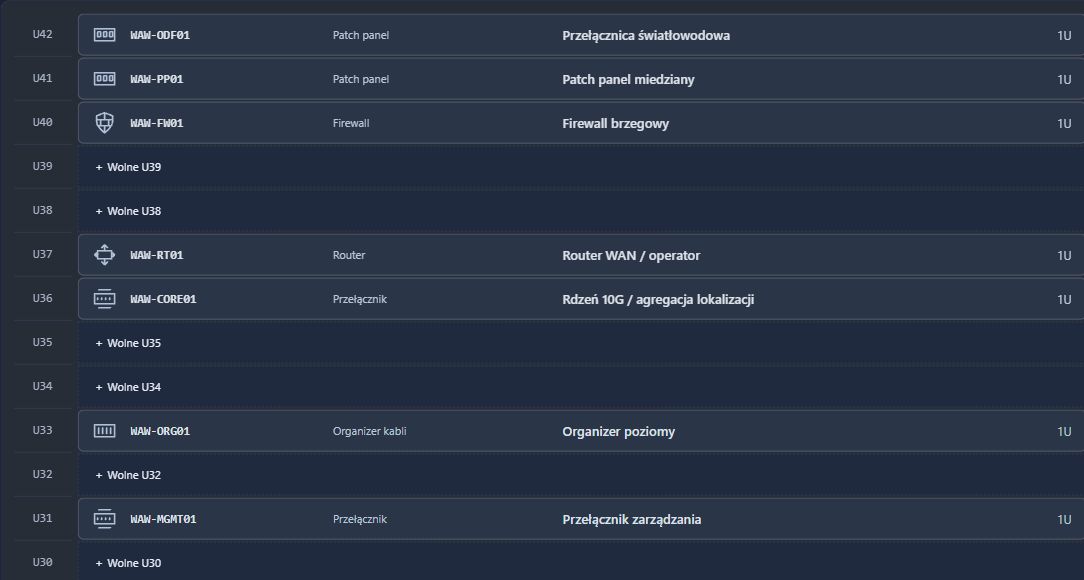
Front, rear and full depth. Check rack occupancy, browse devices and plan their placement in a physical context.
02 / CONNECTIONS
Turn your connection list into a map. Explore locations, racks and devices, filter the view and understand connections between sites.
03 / DETAILS
Document physical connectors, transceivers and cable endpoints. A visual panel shows available ports and ports with documented connections.
04 / SPACE
Upload a floor plan and place assets on it. Connect a physical position with its documentation, then open an asset record from its marker.
05 / FIELD INVENTORY
Connect physical equipment to its documentation. QR labels open asset records, while inventory rounds help record inspection results and discrepancies.
06 / HANDOVER
Prepare a report for a rack, location or client. Choose the information you need and return to your settings with private export profiles.
Screenshots from a running RackDocs instance. All assets and connections shown are demonstration data. Screenshot interface language: Polish.
APPLICATION GUIDE / IT AND OT
Enlarge a screenshot or explore the module in detail. From inventory standards to on-site checks, see the working application.
Clients, locations, racks and off-rack mounting places. A shared structure for server rooms, branches and distributed installations.
Explore the featuresCustom types, additional fields and panel templates. Consistent records for IT equipment and devices in OT environments.
Explore the featuresU positions, front and rear mounting, parameters, serial numbers and device moves that preserve documentation links.
Explore the featuresDevice panels, both cable endpoints, SFP/QSFP modules and records for individual optical fibres.
Explore the featuresFiltered, grouped topology and location floor plans with asset markers. Understand both relationships and physical placement.
Explore the featuresQR labels, inspection scopes, confirmations, missing items and discrepancies. Structured checks instead of scattered notes.
Explore the featuresAuthors, dates, before-and-after values, search and a timeline. A shared context for the team.
Explore the featuresPDF, JSON and CSV, report profiles and import previews. Prepare documentation for review and further work.
Explore the featuresPer-client access, invitations, MFA and a read-only API. Organise collaboration and data access for integrations.
Explore the featuresScreenshots come from the working RackDocs application and show a demonstration environment with fictional infrastructure. They include selected views and screen details; the application is evolving. Screenshots retain the Polish interface in this English guide.
All modules →FROM STRUCTURE TO USEFUL DOCUMENTATION
Start with a client and location. Build your documentation as you explore and develop your infrastructure.
Add clients, locations, racks and named mounting places.
Use templates, add ports and record physical cables.
Use topology, change history, inventory rounds and reports.
MORE THAN AN EQUIPMENT LIST
Administrators, editors and viewers. Assign access in the context of each client.
Author, time, before-and-after values, filters and searchable changes.
Keep installation, cabling and identification context with the right asset.
Assign responsibility and configure change notifications by email or webhook.
Scoped tokens, filters and pagination. An OpenAPI contract for integrators.
TOTP authentication with separate organisation accounts and data in portal mode.
DESIGNED FOR THE PEOPLE BEHIND THE INFRASTRUCTURE
Find devices, check ports and plan changes with documentation at hand.
Join Public TestsOrganise multiple clients’ infrastructure and prepare documentation for handover.
Join Public TestsReview equipment, change history and inventory results in one system.
Join Public TestsFIT YOUR ORGANISATION
We are developing RackDocs in hosted and self-hosted variants. We will discuss deployment and licence terms based on your organisation’s needs.
BE PART OF THE FIRST GROUP
RackDocs is in the internal final test phase. Applications for the Public Tests programme are open. Apply with your team now and we will contact you about the next stage and participation terms.
Current application scope implemented
We are here
The next stage
GOOD TO KNOW
Final internal tests are in progress. Complete the Public Tests form to apply for the upcoming public programme. You will receive an email confirming your application. Access and participation terms will be agreed individually; the form does not automatically create an account.
RackDocs is an infrastructure inventory and documentation tool. Its topology shows recorded devices and connections. Automatic discovery and monitoring are outside the current application scope.
Yes. The RackDocs interface and help are available in Polish and English. The application also offers light and dark themes.
The application supports a self-hosted Docker installation and a hosted portal variant. Availability and licence terms need to be agreed individually.
Yes. PDF reports, infrastructure JSON exports and selected CSV data exports are available. Scope and format depend on the view; JSON import includes a preview and duplicate detection.
Commercial pricing has not been published on this website yet. Contact us about your planned deployment and licensing. This website does not accept payments or orders.
RACKDOCS / PUBLIC TESTS
SHORT SURVEY / ABOUT 2–3 MINUTESTell us what your team needs. Complete this short survey and describe the environment you would like to document in RackDocs.
You will receive an email with your application reference. Access dates and testing terms will be confirmed separately.
Public testing contact: Piotr Wasyk · MWTC
[email protected]